If you have difficulties accessing the repository or, for any reason, need to change your generated access token, please follow these steps.
From the Visual Studio Options dialogue, locate NuGet Package Manager/Configuration Files section:
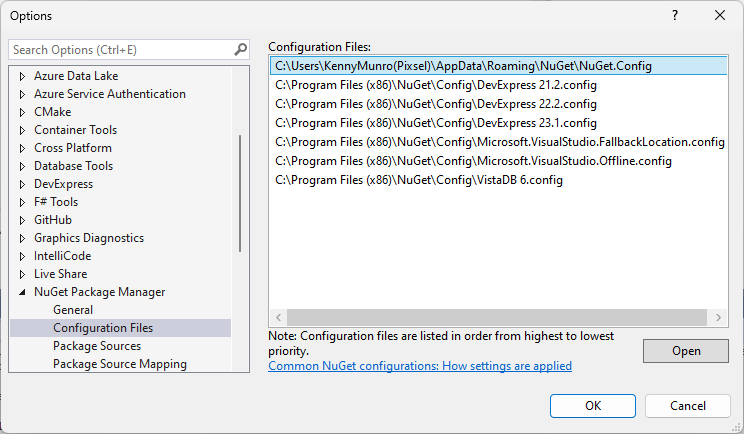
There should be one or more configuration files listed - select the NuGet config file associated with your username and then click Open.
Following is a sample configuration file:
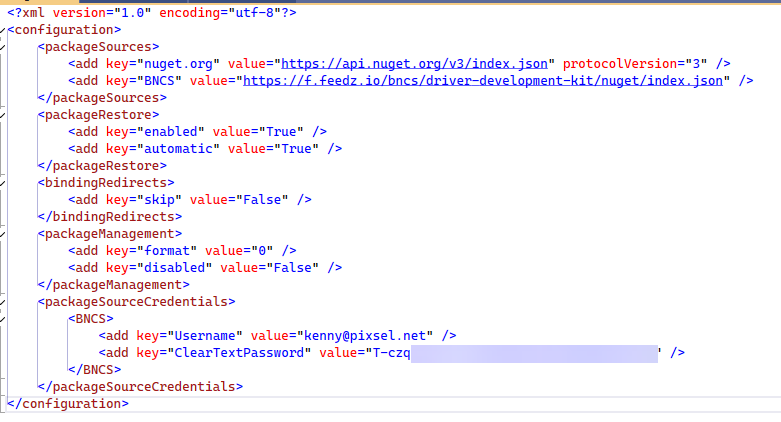
A Package Source entry should already exist for the BNCS NuGet repository. Add or Edit the Package Source Credentials entry with the same name as the repository. This should contain two keys - Username containing your feedz.io registered email address & ClearTextPassword containing the Access Token. After editing and saving NuGet.Config it may be necessary to restart Visual Studio to load the new settings.