Two infodriver update events, OnManagedInfodriverChange and OnMonitoredInfodriverChange are provided by both the BncsInfodriver object and BncsFramework static.
The event signatures for both are identical but the conditions under which each are called differ. If there are ANY subscribers to the BncsInfodriver event then that event is raised, otherwise the BncsFramework event is raised (assuming there are subscribers to that)
Drivers should subscribe to the BncsInfodriver events to provide handlers for changes to a specific infodriver. The BncsFramework events allow handlers for ALL infodriver events EXCEPT those handled explicitly.
It should also be noted that, where an infodriver slot is associated with a Parameter, it will be the parameter handler events that are called rather than the infodriver level one even if the change was initiated at the infodriver level.
Managed infodriver events have the option for the driver to accept or reject the requested change. The BNCSManagedInfodriverChangeEvent argument has an Action property that can be used to modify the event processing. There are three options:
•Continue - the change will have been deemed to be approved by the driver and will be notified to all internal dependencies.
•Cancel - the value is deemed not to have been approved or the driver has sent the value to the connected device and a separate device monitoring process will confirm the change and broadcast it to the BNCS network. Any further processing of the change is cancelled.
•Reverse - the value is deemed not to have been approved but, rather than cancelling further processing, the old value is instead re-asserted.
In the vast majority of cases, a driver should use Cancel rather than Reverse. The only circumstances in which Reverse may be necessary is when a change may already have been partially processed and it is necessary to ensure that it is undone by actively re-asserting the old value.
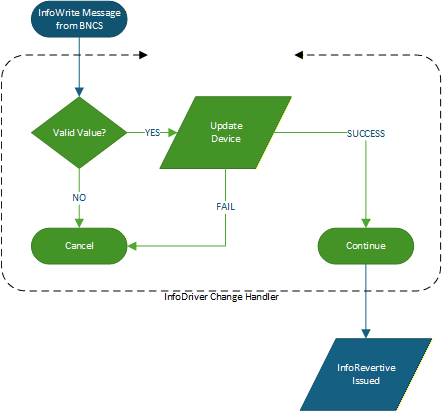
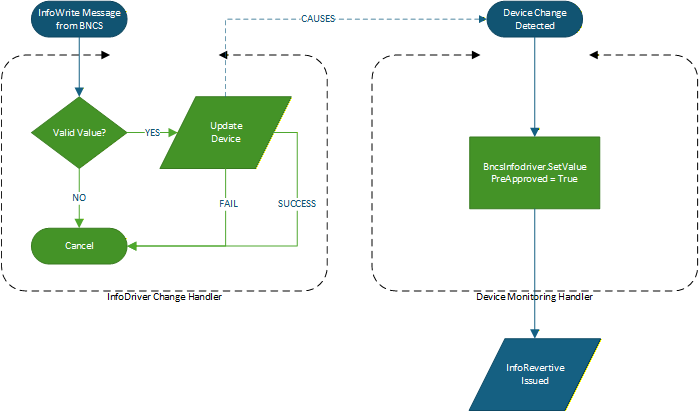
The following two diagrams illustrate the most common patterns for updating a device in response to a BNCS InfoWrite message.
In the first example, the handler validates the value, sends the value to the device and, following successful transmission, exits with the Continue action which then generates the InfoDriver Revertive message.
In the second example, the driver implements a device monitoring process. In this case, the change handler sends the update to the device but then exists with a Cancel action to prevent further processing. It is then the responsibility of the device monitoring process to detect the change and update the Infodriver value.
Applications wishing to handle changes with specific slots within an infodriver can use the BncsInfodriver.AddSlotCallback method to obtain a BncsInfodriverSlotCallback object. A slot specific handler can then be attached to the OnChange event. Callback handlers can be dynamically de-registered using the BncsInfodriver.RemoveSlotCallback method.